


PDG PROmote 2026+
4.346.00 Reviews
App Specs
- Version
- 11.1
- Updated On
- License
- $34.99
- Downloads
- 10,000+
- Developer
- ForceReadiness.com
- Categories
- Education
- Platform
- Android, iOS
Screenshots
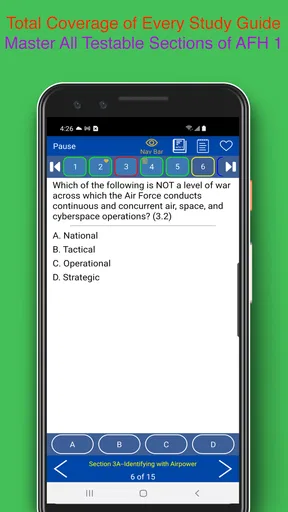
 Analysis by AppCompare
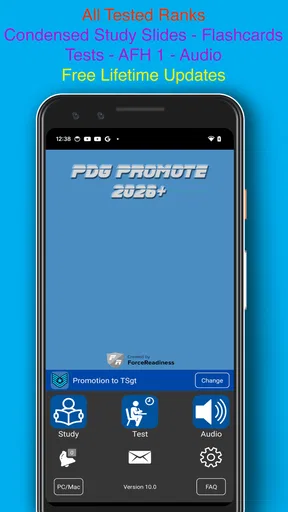
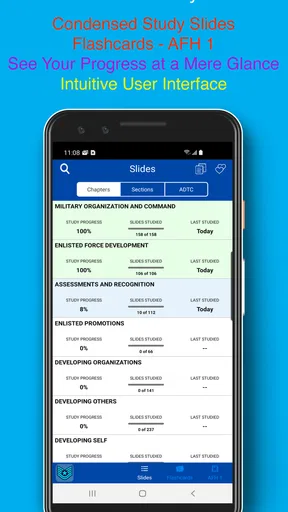
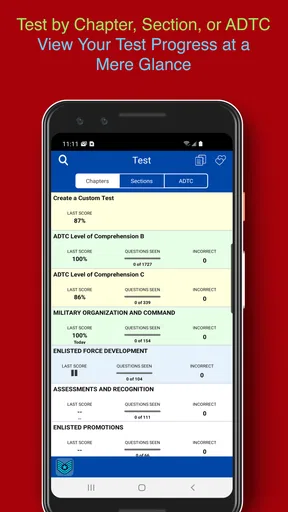
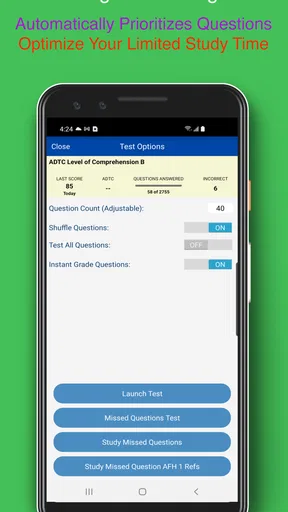
Studying for an Air Force promotion exam is a very different task from casually reading a manual. You need to return to the same material repeatedly, notice what you still miss, and turn scattered study time into something consistent. That is where PDG PROmote 2026+ aims to help. It is an education app from ForceReadiness.com built specifically for Airmen preparing for promotion to Staff Sergeant and Technical Sergeant, rather than a general flashcard tool with military terms added afterward.
I found its strongest value in the way it gives promotion-focused study a clear home on my phone. Instead of carrying notes between unrelated apps or trying to remember which sections deserve another pass, I could use the app as the central part of a repeatable routine. That does not make studying effortless, and it does not replace understanding the material, but it can make preparation feel less scattered.
The app is listed for Everyone, runs on Android nine and later, and costs $34.99. That price makes it a deliberate purchase rather than an app I would install casually and forget. It has a 4.3 average from around 58 ratings, with over 10K installs, so there is enough usage to suggest that it has found a real audience among Airmen. The current release is version 11.1, and it became available on January 15, 2025.
Building a dependable promotion-study routine
I find a dependable routine matters more than a perfect study session, especially when work leaves little room for long blocks of review. In this section, I focus on choosing a manageable starting point and using different sessions for different purposes, so the next section can look at how small adjustments make that routine easier to repeat.
Start with a baseline instead of guessing what to study
My first recommendation is to avoid opening the app with the vague goal of “studying everything.” That approach usually produces a few random sessions and very little sense of progress. A better starting point is to use the first sessions as a baseline. Move through the available study material at a comfortable pace, pay attention to the questions or topics that slow you down, and make a mental note of where recall feels weak.
This matters because promotion preparation has two separate problems. The first is exposure: you need to encounter the material. The second is retrieval: you need to produce the correct answer without relying on recognition alone. An app like this is most useful when I treat every uncertain answer as information about my next session, not as a reason to rush ahead.
I would begin with short sessions rather than trying to complete a long block immediately. A short session before work, during a lunch break, or after dinner is easier to repeat. Once the habit is stable, longer sessions become more useful because I already know how to use the app and which areas deserve attention.
Worth Reading Before You Choose

EA SPORTS FC Mobile 26 Is a Bigger Football Game, but It Takes Time

Flipboard Shows What News Apps Must Do Beyond the Feed

Switching to Android Auto Means Rethinking Your Driving Routine

Google Calendar Makes a Crowded Week Easier to Manage

Ludo King Makes the Most of the Minutes Between Plans

Baby Panda World Brings Quick Play to Modern Phones, but Its Game Library Feels Busy
A realistic everyday workflow
Imagine an Airman with a busy shift schedule who has twenty minutes before leaving for work. I would use that time for a focused review, stopping when attention starts to drop instead of turning the session into passive tapping. Later, perhaps after dinner, I would return to the items that felt uncertain and explain the answer to myself in plain language. On a less busy day, I would use a longer session to cover broader material and then finish with a quick check of the weakest areas.
The important habit is separation. I would not use every session for the same purpose. One session can be for discovering gaps, another for practicing recall, and another for checking whether the information still comes back after a delay. This makes the app more than a digital reading screen. It becomes a place to organize the rhythm of preparation.
The best results come from treating PDG PROmote 2026+ as a study system, not as a last-minute answer machine. If I only open it the night before an exam, I may recognize familiar wording without being able to explain the underlying point. Repeated, purposeful use is where the value of a dedicated promotion app becomes clearer.
Use the phone as a boundary, not a distraction
Because the app lives on a phone, it is convenient and easy to reach. That is helpful when a spare moment appears, but it also creates an obvious risk: a study session can turn into ordinary phone use. I would open the app with one specific goal, keep the session short enough to finish cleanly, and close it when that goal is complete.
I also prefer to study in the same general order whenever possible. A predictable sequence reduces the time spent deciding what to do next. For example, I might begin with material I have not reviewed recently, move into questions that previously caused trouble, and finish by revisiting one or two concepts I want to explain without looking. The app supplies the subject focus; the routine supplies the discipline.
What the price means for different users
At $34.99, this is not the right choice for someone who only wants to browse a few sample questions. I would consider the purchase more reasonable for an Airman who has a defined promotion goal and expects to study consistently. The dedicated focus can save time compared with assembling scattered notes, general flashcard apps, and informal study groups, but only if that focus matches the way you prepare.
Someone who already owns a trusted study package, has a well-organized personal system, or prefers learning entirely from official source material may not gain enough from adding another paid tool. On the other hand, a user who keeps postponing study because the material feels unstructured may benefit from having a single, promotion-specific app ready to open.
Settings, shortcuts, and repeatable patterns
Once a routine is in place, I pay attention to the little decisions that either protect study time or make it harder to use well. Here I look at how to approach settings and navigation without changing everything at once, then move into repeatable patterns for returning to uncertain material while keeping speed from replacing careful recall.
Check the basics before settling into a routine
Before judging the app after one session, I would spend a few minutes checking how its available study controls fit my habits. The useful question is not whether every option looks impressive; it is whether the app can support the way I actually study. Look for practical controls related to how material is presented, how you move through it, and how easily you can return to difficult items. I would test those choices during a normal session rather than changing several things at once.
Changing one setting at a time is a small but valuable discipline. If I alter the presentation, navigation, and review behavior together, I cannot tell which change helped. A better approach is to use the default arrangement for one session, adjust one option, and then compare how naturally the next session feels. This is especially useful for experienced users who already know whether they prefer a fast question cycle or a slower read-and-reflect approach.
I would also check the app after updating it to the current version, 11.1, before building a long-term routine around a particular layout or behavior. That is not because an update is automatically better, but because small interface changes can affect muscle memory. A quick check prevents an important study session from being spent figuring out where familiar controls moved.
Make navigation serve the weak areas
One of the easiest mistakes is to move through the app in a perfectly orderly sequence even when your knowledge is uneven. Order is comfortable, but it can hide weak spots. I would use the navigation options to move deliberately between broad coverage and targeted review. After a general session, I would return to the sections or questions that demanded the most effort rather than simply continuing from the point where I stopped.
This creates a useful two-pass pattern. The first pass keeps the whole subject in view. The second pass concentrates on errors, hesitation, and concepts that sound familiar but are difficult to recall. I find this more efficient than repeating an entire study session from the beginning, particularly when time is limited.
Use shortcuts as decisions, not decoration
Any quick-access behavior in a study app is valuable only when it reduces a real interruption. If the app lets me reach a preferred area or repeat a common action more directly, I would reserve that shortcut for the part of the routine I perform most often. The goal is not to make the interface look fast; it is to protect study time from unnecessary navigation.
For example, if I repeatedly return to difficult material, I would make that route part of my normal closing routine. I would finish a session by identifying what needs another look, then use the quickest available path to begin the next review there. This turns a vague intention—“I should study that again”—into a repeatable action.
There is a trade-off here. Speed can encourage shallow study. If I move through prompts too quickly, I may confuse recognizing an answer with knowing it. I would keep shortcuts for transitions between tasks, not for skipping the thinking required to answer. A fast route to a weak area is useful; a fast route past the explanation is not.
Repeatable habits that improve recall
I would use a simple three-stage cycle with this app. First, answer without immediately searching for reassurance. Second, pause on uncertainty and put the concept into my own words. Third, revisit the same area later rather than assuming one correct response means the topic is mastered. This cycle is more demanding than tapping through familiar material, but it gives each session a clear purpose.
Another useful habit is to end before fatigue turns the session into noise. When I notice that I am selecting answers based on wording rather than meaning, I would stop and return later. A shorter session with honest recall is more useful than a long session where I am merely trying to finish.
I would also keep a very small external note of recurring trouble spots, without copying the whole study material. The note might contain a topic label and a question I still cannot explain. That makes the next app session intentional while keeping the app itself as the main study environment. It is a practical compromise for users who want more control without building a second, complicated system.
How it compares with common alternatives
Compared with reading a printed guide from beginning to end, this app offers a more active way to check whether information is actually coming back to me. Reading remains useful for context and careful explanation, but it can create a false sense of confidence. The app is stronger when I need repeated retrieval and a convenient way to fit study into irregular days.
Compared with a general flashcard app, its advantage is focus. A general tool may offer more flexibility for creating unrelated decks or combining subjects, but that flexibility also requires more setup and maintenance. PDG PROmote 2026+ is aimed at Airmen pursuing promotion, so I do not have to spend the same amount of time designing the subject structure myself.
Compared with informal notes or group messaging, the app is less dependent on someone else being available and less likely to bury study material beneath unrelated conversation. However, those alternatives can be better for discussion, explanation, and accountability. I would not use this app as a complete replacement for talking through difficult concepts with a knowledgeable colleague.
Where the app reaches its limits
The most important limitation is that a dedicated study app cannot guarantee understanding or exam readiness. It can make practice more organized, but the quality of the result still depends on whether I slow down, review mistakes, and connect answers to the broader material. A user who wants an effortless path to promotion will probably be disappointed.
The price is another meaningful limitation. Because the app is paid, the decision deserves more thought than downloading a free utility. I would skip it if I were only curious about the subject, if my promotion timeline were uncertain, or if I already had a study method that I followed consistently. Paying for a focused tool makes sense when it removes a real obstacle, not simply because it has a military-specific label.
I would also avoid relying on it alone when I need detailed context, official clarification, or a deeper discussion of a topic. The app can be the center of a practice routine, but it should not become an excuse to ignore authoritative study resources or workplace guidance. Its role is strongest in reinforcement and recall.
Who should use it and who should pass
I think this app is best suited to Airmen preparing specifically for SSgt or TSgt promotion who want a dedicated mobile study companion. It is particularly appealing if your schedule changes often, if you study in short bursts, or if your current method consists of several disconnected notes and resources. The focused design can help turn spare minutes into deliberate practice.
I would be more cautious recommending it to someone who learns best through long-form reading, classroom discussion, or handwritten organization. Those methods may remain central even if the app is added as a review tool. I would also pass if the cost feels uncomfortable or if you are looking for a broad education platform rather than promotion preparation.
My verdict after using it as a study companion
PDG PROmote 2026+ earns its place by staying focused on a specific and demanding goal. I like it most when I use it with a plan: a short baseline session, targeted return visits, honest attention to uncertainty, and regular pauses before fatigue takes over. Its value is less about flashy convenience and more about reducing the friction between deciding to study and actually beginning.
ForceReadiness.com has positioned this as a specialized education app rather than a general learning platform, and that specialization is both its strength and its boundary. If you are preparing for Air Force promotion and want one mobile tool around which to build a repeatable review habit, I can see the $34.99 cost being worthwhile. If you already have a reliable system or need deep explanation instead of active recall, another option may serve you better.
My final recommendation is conditional but positive: choose it when your real problem is keeping promotion study organized and consistent. Use the settings to remove small delays, use shortcuts to return to weak areas, and keep the routine honest enough that correct guesses do not count as mastery. With that approach, this app becomes a practical part of preparation rather than a shortcut that promises more than any study tool can deliver.
Pros
- Streamlines access to updated professional development resources.
- Useful for checking schedules
- announcements
- and event-related information.
- Compact design makes key sections easy to find on mobile devices.
- Can help users stay informed without relying on printed materials.
- Suitable for professionals who need information while traveling or onsite.
Cons
- Some content may depend on an active internet connection.
- Information usefulness can vary by region
- event
- or user profile.
- Push notifications may become excessive if many alerts are enabled.
- The app may offer limited value outside the 2026+ program period.
- Older devices may experience slower loading with media-rich sections.
FAQs for PDG PROmote 2026+
What is PDG PROmote 2026+ used for?
PDG PROmote 2026+ is designed as a promotional and marketing companion for users who need to organize, present, or manage promotional content. Depending on the version and account setup, it may provide access to campaigns, product information, promotional materials, announcements, or business resources. Before downloading, check the official description to confirm that its tools match your professional or personal needs.
Is PDG PROmote 2026+ free to download and use?
The application may be available to download at no initial cost, but some features could require an account, authorization, subscription, or access provided by an associated organization. Availability of paid tools can vary by platform, region, and user type. We recommend reviewing the store listing and any in-app terms carefully so you understand possible charges before creating an account or activating premium functionality.
Do I need an account or invitation to access PDG PROmote 2026+?
Many promotional and business-focused applications restrict access to registered users, employees, partners, or invited customers. PDG PROmote 2026+ may therefore require login credentials, an invitation code, or approval from the organization managing the service. If you can install the app but cannot sign in, contact the relevant administrator or support team rather than creating multiple accounts or entering unverified information.
What permissions and personal information may PDG PROmote 2026+ request?
The permissions requested by PDG PROmote 2026+ depend on the features enabled in your version. It could ask for internet access, notifications, storage, camera, or other permissions when those functions are needed. Before accepting, review the permission explanations and the developer’s privacy policy. Only grant access that seems relevant, and use your device settings to revoke permissions later if necessary.
Will PDG PROmote 2026+ work on every Android or iOS device?
Compatibility depends on the operating system version, device hardware, screen size, region, and the current release published by the developer. Older phones or tablets may not support the latest build, while some features may require a stable internet connection or updated system services. Check the official Google Play or App Store listing for supported versions, required storage, and any regional availability restrictions before downloading.


